

Managing several search advertising campaigns at once can be difficult for agencies and advertisers. Managing them across multiple platforms and media channels is even more demanding.
This is where Search Ads 360 comes in.
What Is Search Ads 360?
Formerly DoubleClick Search, Search Ads 360 is an advanced search management platform giving brands an integrated interface for multiple advertising accounts and campaigns across search engines. It is natively integrated with Google Marketing Platform, allowing advertisers to manage and monitor campaigns from one place.
The platform offers an organised workflow and powerful reporting for efficient campaign execution, while automated bidding improves performance.
How Does Search Ads 360 Work?
It follows an agency structure, allowing multiple advertiser accounts within one network. Each advertiser account has its own paid search engine accounts and campaigns:
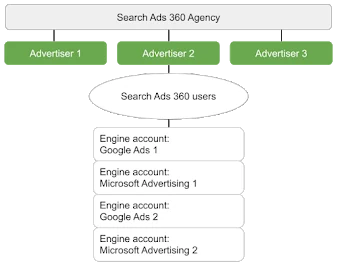
Search Ads 360 follows an agency structure.
Like agencies with separate teams managing search and social marketing for different brands, Search Ads 360 lets you manage several advertisers within one agency network. Each advertiser has a user group that can view reports and edit settings.
Direct API connections allow changes to campaign settings, keywords and ads on supported engines:
- Google Ads
- Microsoft Advertising
- Yahoo! Japan Sponsored Products
- Baidu
- Yahoo! Gemini
The platform retrieves data directly from these engines, combines it and presents it in a user-friendly interface.
Synchronisation works both ways. After connecting an engine, you can create and manage campaigns in the platform and have changes applied automatically to that engine. You can also make changes directly in an engine and import, or synchronise, them into the Search Ads 360 dashboard.
Search Ads 360 uses its own tracking URL, the “clickserver URL”, to monitor performance for individual ads, keywords and other items. How an engine interacts with this URL depends on its support for parallel tracking.
On engines without parallel tracking, URL redirection populates performance metrics. A click passes through one or more services or vendors before reaching the webpage. These services can add information to the URL or use its existing information for tracking.
Components of the Platform
Search Ads 360 has three components:
- Campaigns: Several campaign types are available:
You can create campaigns in the platform or import existing ones from search engines by synchronising them.
- Bid strategies: Optimise spend across supported engine accounts. Automated strategies aim to maximise performance across engines. Smart Bidding, for example, finds suitable bids to maximise conversions at a target CPA, effective revenue share (ERS) or return on ad spend (ROAS).
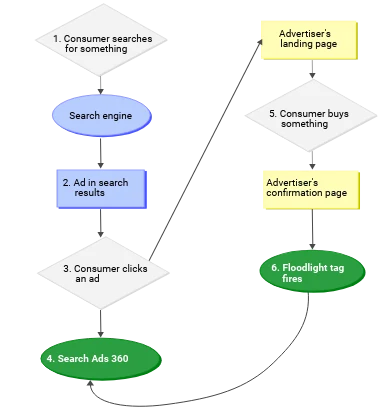
- Reporting: Monitor performance across engines, strategies and campaigns. Floodlight tags track website activity and conversions, while reporting features add conversion data to reports.
Google's linked article provides more information about additional features supported by Search Ads 360.
Search Ads 360 synchronises with multiple engines and platforms to give advertisers a unified, integrated search advertising experience.
Why Use Search Ads 360?
Without it, you need to manage ads and keywords separately in every engine, making cross-engine performance analysis unnecessarily difficult.
The platform also provides automated bidding strategies that save time, reduce complexity, improve decisions and increase search marketing ROI.
Key Benefits
Serve Relevant Ads and Keywords Across Engines
Use Search Ads 360 campaigns to traffic ads and keywords across supported engines. Items in a Search Ads 360 campaign map to corresponding engine objects through direct API connections.
When someone searches one of your selected keywords, an ad from the campaign may appear. Its position depends on the bid and, depending on the engine, other factors such as ad quality and CTR. You can set the bid and many other properties directly in the dashboard.
Use Optimised Bid Strategies
Optimise spend across supported accounts. The platform monitors keyword and product-group performance and adjusts bids to achieve:
- The highest number of conversions
- The highest revenue
- The ideal ad position
- The most clicks available within the campaign budget
Depending on the engine, bid strategies adjust or recommend bids for location, mobile and remarketing targets. Instead of manually responding to campaign changes, you can automate the process with a Search Ads 360 bid strategy.
Review Ad and Keyword Performance
The Campaigns tab provides direct analysis of your ads and keywords. It offers a snapshot of bid performance and health and shows performance against specific metrics, including clicks, total cost per action and conversion percentage.
Note
Search Ads 360 provides the features needed for faster insights, better collaboration and stronger results. You can manage paid search across engines, accounts and campaigns in one place, keeping simultaneous campaigns organised and easier to run.
Automated bidding and advanced reporting help advertisers and agencies manage search campaigns more effectively and achieve positive ROI across multiple engines.



Comments