


Do you think Google is having trouble indexing your website? These six fundamentals can help you investigate indexing problems.
There are many possible reasons why Google may not index a web page. Here, we will look at six issues that come up frequently.
Your Code May Be Too Complex
Complex code can be a significant problem for Google's crawl budget and can make indexing difficulties more likely. The issue is less about which language the site was written in and more about outdated implementation techniques or JavaScript versions.
If your website does not meet relevant standards, Google's responsive website guidelines can help. It is also useful to check the W3C standards.
Your Website May Load Slowly
If your website takes much longer than average to load, do not ignore it. Google is not keen to include this kind of site in its index. Slow loading can have several causes.
There may be more content on the page than a user's browser can comfortably process, or the site may be running on an outdated server with limited resources.
When PageSpeed is scored out of 100, achieving a perfect result is not always easy. Aim for a score of at least 60 and, ideally, as close to 100 as possible. Avoiding off-the-shelf structures and paying attention to technical details such as the server can help.
Many tools can be used for this task. Each provides a report based on its own guidance as well as shared performance criteria. Google PageSpeed Insights is one of the tools we use most often. It analyzes your page against performance practices such as reducing requests and payload size and taking advantage of browser caching, all of which matter for loading speed. It then recommends ways to improve individual aspects of the site.
There May Be a Redirect Loop
Redirect loops are another source of indexing problems. A simple typing error can be enough to cause one.
They usually result from a poorly configured redirect setup. Incorrect rules in the web server configuration, the CMS redirect manager or the CDN, or conflicting settings between these systems, can create a loop.
The way you investigate the cause depends on your infrastructure and configuration.
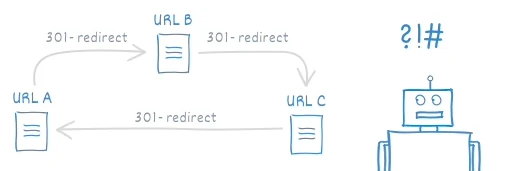
A redirect loop produces a browser error, preventing visitors from seeing the destination page. The same applies to search engines: once they recognize the loop, they stop following redirects and never reach the target.
Make Sure Googlebot Is Not Blocked
Blocking Googlebot's access prevents it from crawling the site and indexing pages.
The robots.txt file is where we encounter this most often. It lets you direct how bots crawl your website.
User-agent: *
Disallow: /
If you see these lines, your entire site is blocked from crawling by all bots. There may also be a rule specifically targeting Googlebot:
User-agent: Googlebot
Disallow: /
If robots.txt is not the problem, individual pages may include noindex or nofollow directives in their meta tags. A detailed check will help establish whether this is happening on your site.
You can see blocked pages in Google's Index Coverage report. You can also test a particular page with the Search Console URL Inspection tool.
Do You Have a Sitemap?
One of the most important files is sitemap.xml. That is its familiar name, though the filename can differ :)
Your website should have a sitemap. This protocol helps Google Search Console discover, crawl and index your pages. Without one, Googlebot may lack an overview unless all your pages are already indexed and receiving traffic.
It is worth remembering that HTML sitemaps are no longer supported in Google Search Console. XML sitemaps are the preferred format today.
Could Your Website Have Been Penalized?
Google has repeatedly stated that penalties can follow a website. If you received a penalty and have not addressed its causes, Google may not index your site.
Resolving this is often neither quick nor easy. What remains of the earlier issues, how long they persist and what progress you make will shape Google's response.
If your site has been penalized, the safest approach is to remove the remaining problems completely. You may need entirely new content and to rebuild the domain from scratch, or undertake a complete content revision.
Use Search Console regularly and make sure changes to your site are made deliberately and with a clear understanding of their effect.
A final note:
Remember that many issues beyond these six can cause indexing problems. Keep reviewing possible technical SEO errors or overlooked configuration changes, redirects between http:// and https:// or www and non-www URLs, mobile compatibility and other significant factors. If you are experiencing these problems, you can contact me.
Gökhan AKSOY



Comments