

Google Ads optimisation score arrived in October 2018 to help Google Ads users get more from their advertising campaigns.
What can we, as advertisers, learn from it, and how should we interpret it?
In this article, you will learn what the new feature is, how it is calculated and how to improve your score.
What Is Google Ads Optimisation Score?
Google's advertising optimisation score is a percentage indicating how well your campaigns are optimised against factors such as bid amounts, keyword types and bidding strategy. The feature was first announced in July 2018 and is now available to all users.
The score appears in your account as shown below; the percentage varies by account:
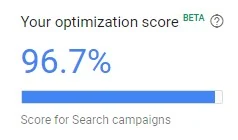
With this beta feature, users can assess their campaigns' effectiveness using an optimisation score. Remember that it is available only to Google Ads users with active Search campaigns. It is not available in AdWords Express.
How Is the Score Calculated?
Google's optimisation score is calculated in real time from 0–100%, based on campaign performance and your implementation of Google's recommendations.
When calculating the score, Google assesses your campaign's:
- Bids and budgets
- Ads and extensions
- Keywords and targeting
- Repairs
Other factors affecting the score include:
- Statistics, settings and the status of your account and campaigns
- The impact of relevant recommendations
- Recent recommendation history
- Trends in the advertising ecosystem
If your score is below 100%, Google offers recommendations and shows how accepting them would affect it. Recommendations expected to have a greater impact on campaign performance carry more weight in the overall score. Their effect is represented by a “score uplift” from <0.1% to 100%, reflecting the estimated impact on overall campaign performance.
How Can You Improve Your Optimisation Score?
Recommendations are designed to optimise your budget by improving bids, keywords and ads. The ultimate goal is to increase your campaigns' overall performance and efficiency.
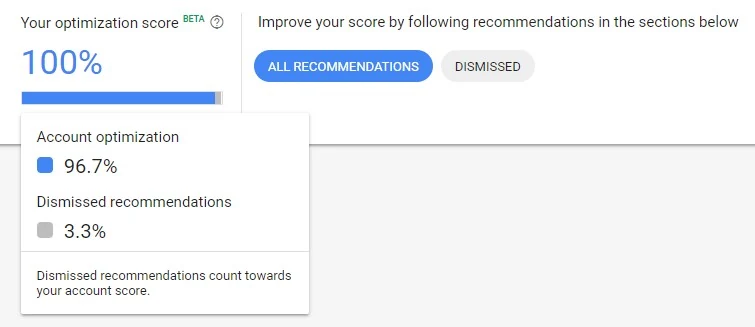
To improve your score, you should accept or dismiss Google's recommendations. Either choice updates the score according to the relevant criteria. If you dismiss recommendations, you can see the grey portion by hovering over your score. You can view dismissed recommendations at any time by clicking “Dismissed”:
Checking Your Score and Accepting or Dismissing Recommendations
After signing in to Google Ads, click Recommendations in the left-hand navigation. Your optimisation score appears at the top of the Recommendations page.
Below it, you will see Google's recommendations for your account.
You can view all recommendations at a glance or inspect each individually. “Learn more” explains its expected impact and why it was suggested. If there are many recommendations, you can filter them by category.
To implement recommendations from Google optimisation score, use the relevant “Apply” button for the selected recommendation or apply all of them. Alternatively, choose Dismiss to ignore them.
The “Potential score” label shows the percentage by which a recommendation would increase your score.
Google Ads Optimisation Recommendations
Recommendations are specific to each account, but here are some examples you may see:
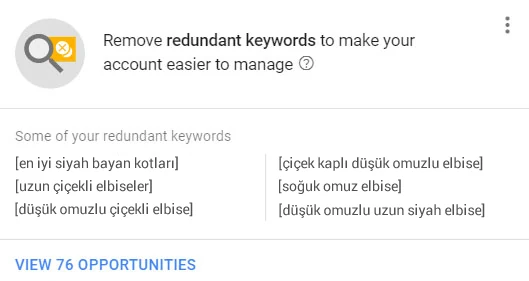
- Remove redundant keywords: Make your account easier to manage by removing unnecessary keywords.
- Add landing pages for your ads: Landing pages relevant to your prospective customers are missing.
- Bid more efficiently with enhanced CPC: Automatically optimise your bids at auction for keywords more likely to convert.
- Bid more efficiently with Target CPA: Get more conversions at a lower or similar CPA using a fully automated bidding strategy.
Target cost per acquisition and enhanced CPC (ECPC) are automated bidding strategies used to increase conversions.
- Lower your bids: Reduce bids to get more clicks at the same or a lower cost.
- Raise your budgets: Address limited budgets so your ads keep running on the busiest days.
- Add new keywords: Show your ads for more searches relevant to your business.
- Improve your mobile site: Avoid losing customers on mobile devices. Analyse mobile site optimisation and its effect on conversions.
Improve Campaign Performance with AMP Landing Pages
While Google continues to make its advertising platform more visually user-friendly, maximising ad performance through optimisation score requires a hands-on approach to the key areas of a successful campaign.
One such area is the advertising landing page. As mobile advertising grows in popularity, advertisers should prioritise pages optimised for mobile devices.
Issues with speed, design and user experience often indicate poorly structured mobile landing pages.
To learn more about AMP and begin implementing it, visit ampproject.org.



Comments